Everything inside
One system for the whole agency. From the first enquiry to the review after the keys.
Most agencies run on a portal inbox, a spreadsheet, a calendar, a website builder, an invoicing tool, contract templates in Word and a WhatsApp on somebody's personal phone. Sentira puts all of it in one place, on one login per person, and every part knows what the others know. Below is every module and how it actually works.
What stays outside, honestly: your portal subscriptions are still between you and the portal, and your accountant still files your taxes. The accounting module gives you the numbers, it does not replace the filing.
01 · Enquiries
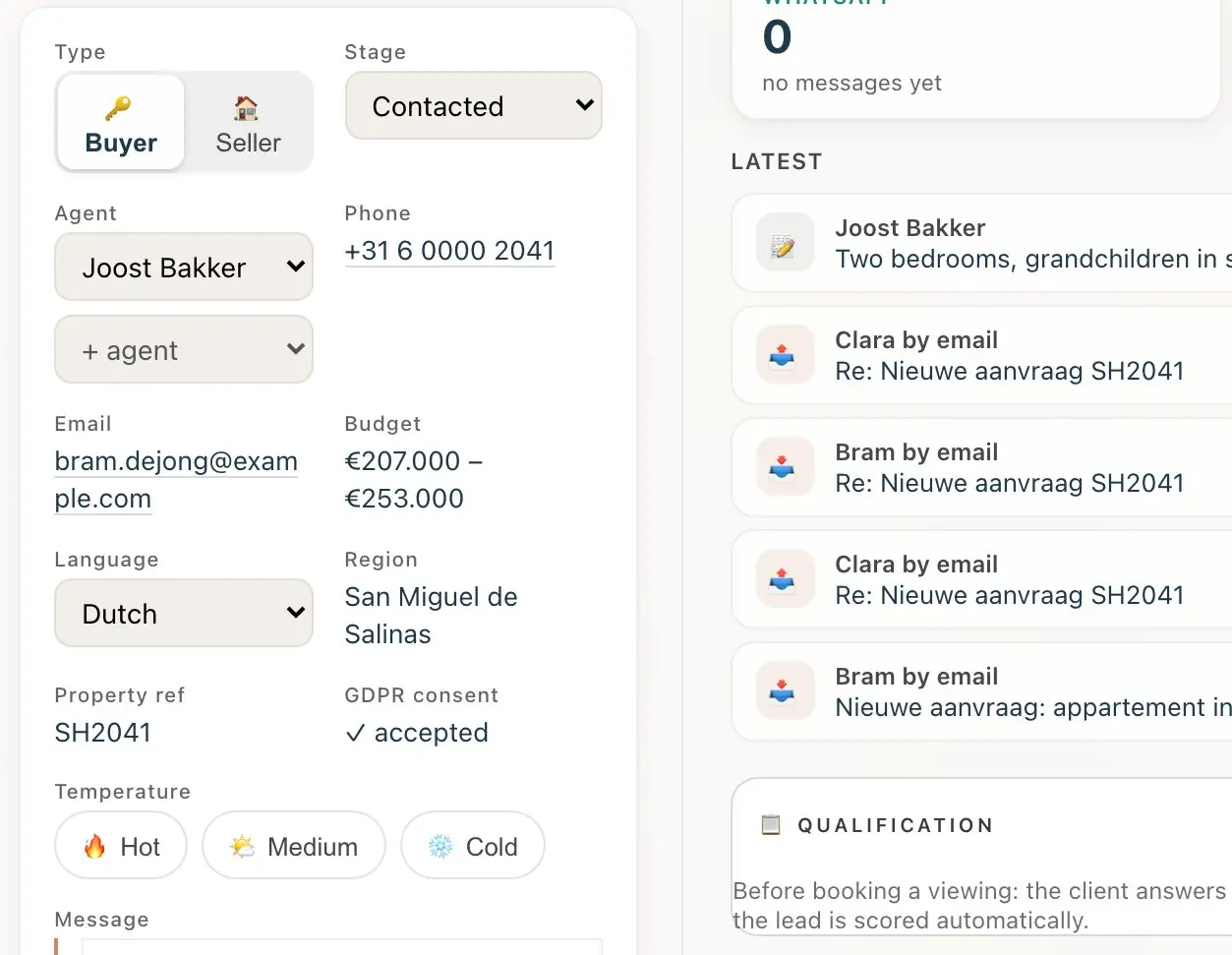
Every enquiry lands in one place, already filled in.
Portals, your website, web chat and your own mailbox all feed the same board. Nobody copies a name and phone number out of an email again.
How it works
- On day one you get a forwarding address. Point your portals at it, and connect your own mailbox whenever you like.
- Each enquiry is read and turned into a client card: name, phone, language, budget and the property reference. The major portals are recognised by name, including idealista, Kyero, thinkspain, Green-Acres and A Place in the Sun.
- Website forms pass a spam filter first, and a client who writes twice is flagged as a possible duplicate you can merge in one click.
- An agent is assigned and notified, and the client gets an acknowledgement within a minute, from your address.
02 · Routing and chasing
The right agent gets it. Nobody gets forgotten.
Leads are shared out by rules you choose, and anything left untouched is chased before it goes cold.
How it works
- Routing by the client's language, round robin by current workload, or always to you. With several offices, the office is picked from the town or reference asked about.
- Holiday cover: an agent who is away does not receive new clients, and their incoming ones go to a colleague.
- A watchdog chases untouched new leads. Cooling clients create a task. Long-term buyers get a gentle follow-up over months, not a single email.
- "Remind me to call her on Thursday" becomes a reminder in the app or by email, and each person gets one daily digest instead of ten alert emails.
03 · The assistant
A colleague that works inside the CRM, not a chatbot bolted on.
It answers clients by email and web chat in eight languages, from your address, and your team can ask it to do real work in plain words.
How it works
- You choose its name and face from a library. Clients only ever see your agency.
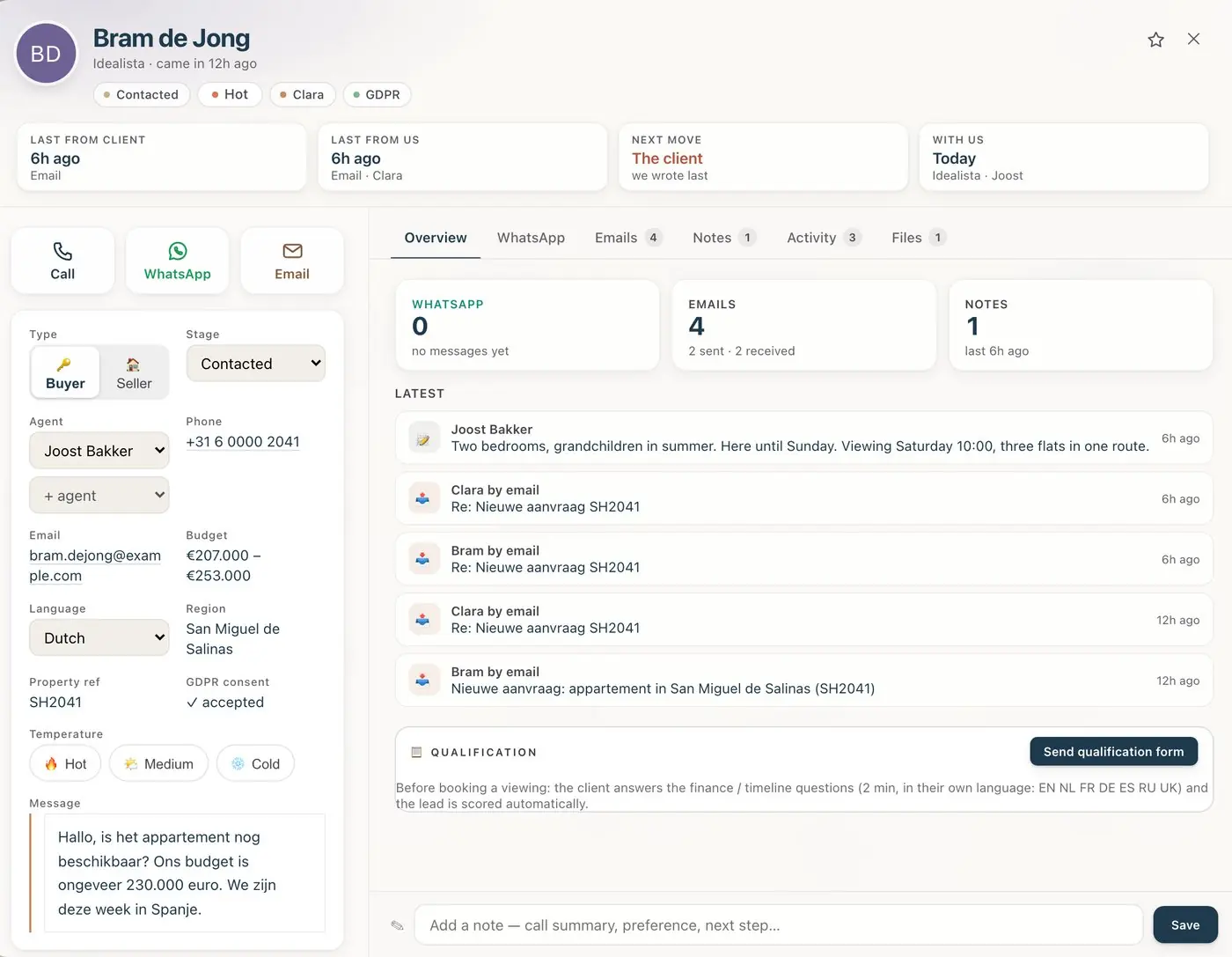
- With clients, it replies in the language they wrote in, asks the questions that qualify them, and steps back the moment your agent takes over.
- With your team, it uses the CRM's own tools: find and update leads, move stages, book events and reminders, search stock, build and send a selection, draft a contract, prepare an invoice or estimate, and add a team member.
- Every tool has a minimum role, checked on every request, so an agent cannot ask it for something only an admin may do. The AI dashboard shows everything it did.
Billed on what it uses, at cost plus 15%, with a monthly limit that pauses it before a runaway month reaches your invoice.
04 · Pipeline and the client card
Buyers and sellers, each on their own board.
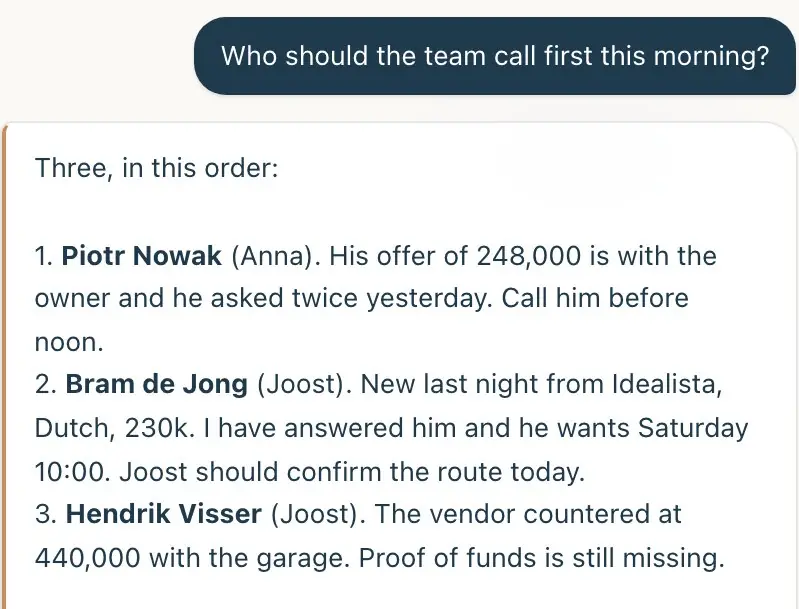
Every client has one card with the whole story on it: what they asked, what was sent, who spoke to them and what happens next.
How it works
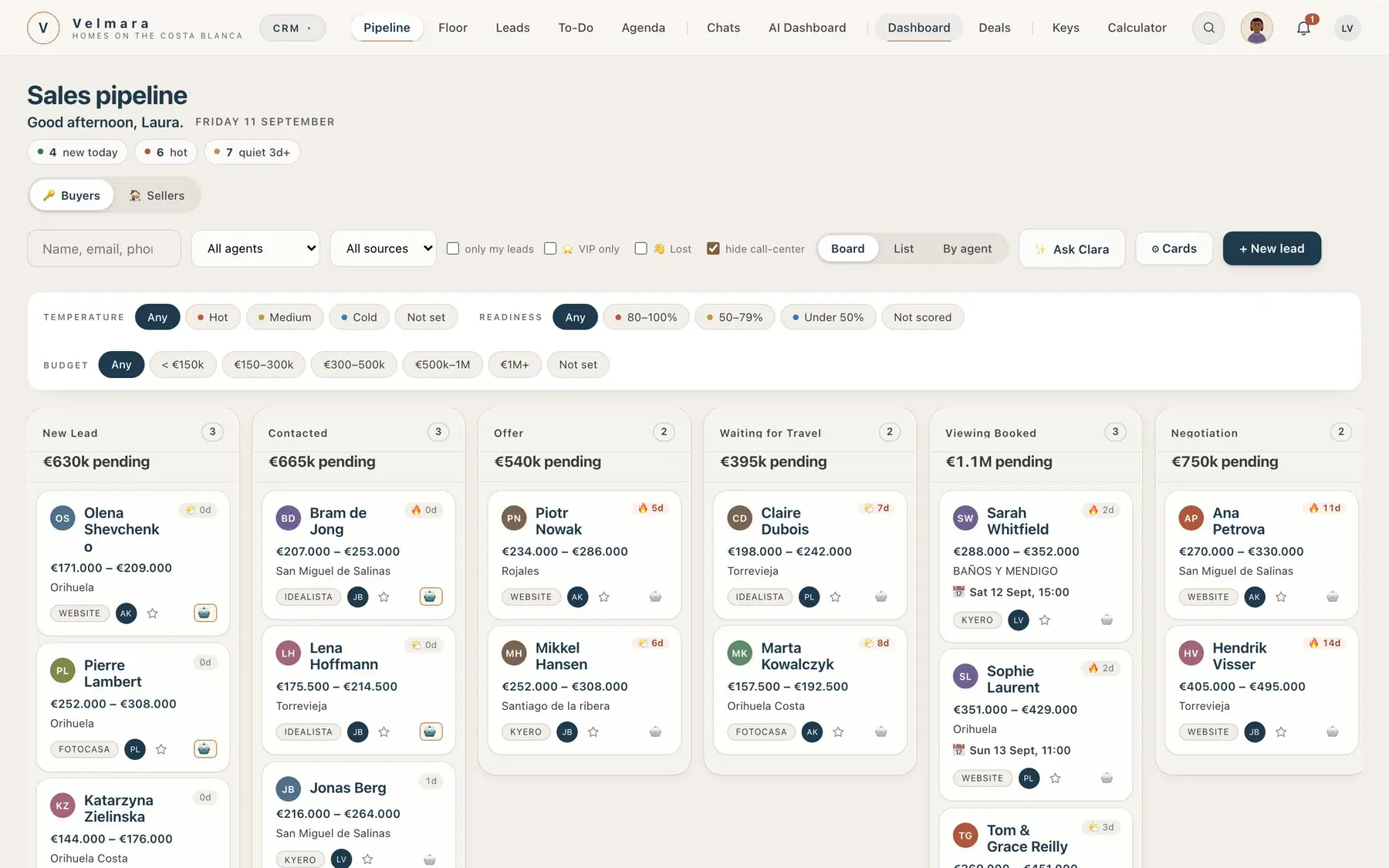
- Separate Buyers and Sellers boards, as a kanban, a table, a list, or split by agent.
- Filter by heat (hot, medium, cold), VIP, budget or lost. When a client gives no budget, one is estimated from the property they asked about and marked as an estimate.
- A short qualifying questionnaire scores the client, and the assistant will not hand a client to an agent until budget and intent are known.
- Sellers get their own valuation form, so an owner never receives buyer emails. The result sits on the card.
05 · The Floor
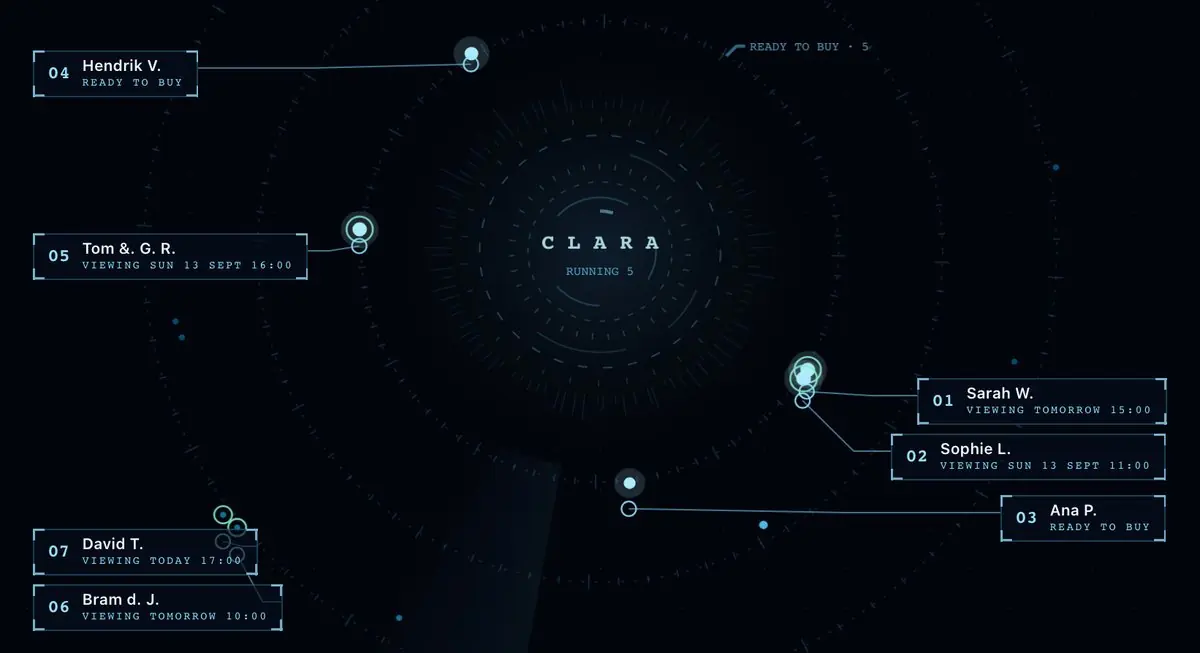
One live screen for who is ready to buy.
What is going out to clients, what is coming back, and every client as a dot that moves closer to the centre as they get readier.
How it works
- Every client gets a readiness score each day, worked out from what they have actually done.
- The orbit puts them on a dial. The ones who need a person today are obvious at a glance.
- Clients who are cooling off are spotted before they go quiet, and a task lands with their agent.
06 · Agenda, to-dos and keys
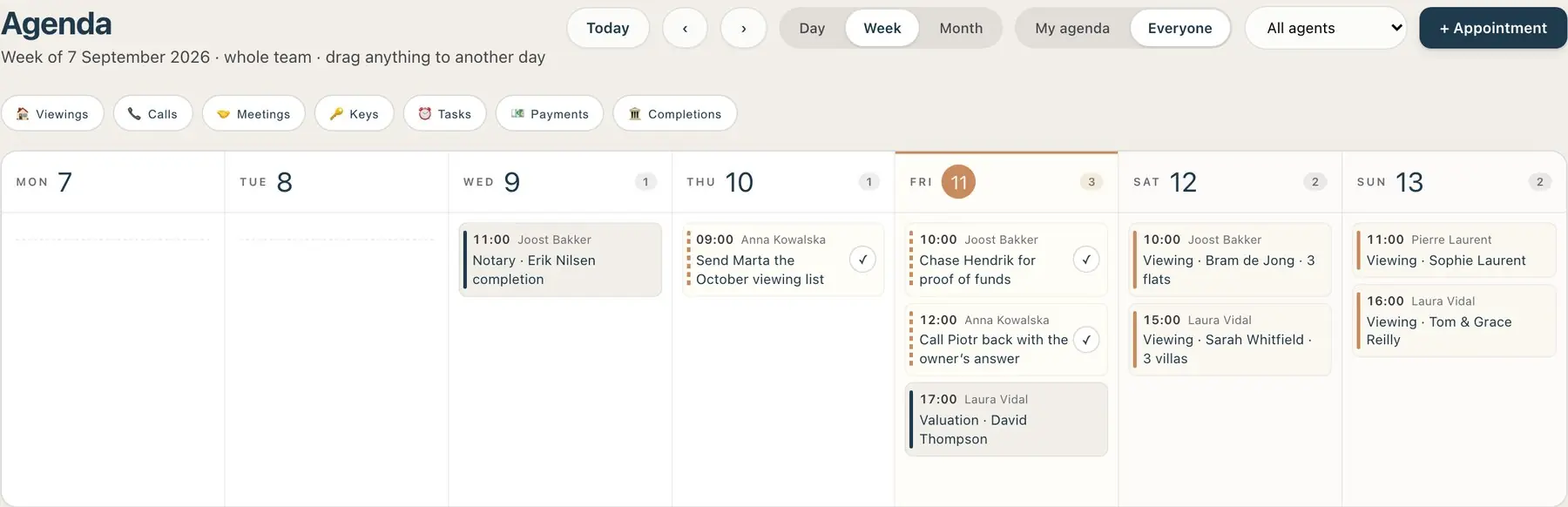
The team's week, and where every key is.
Viewings, valuations, notary appointments and tasks in one agenda, with a key register that chases the keys that did not come back.
How it works
- Each person has their own agenda and to-do list. Managers can see the whole team and book into a colleague's diary, if you allow it.
- The key register logs who took which key and when. The holder gets a return link, and overdue keys are chased automatically.
- The key board shows every key at a glance, and exports to a spreadsheet.
07 · Conversations
Email, web chat, WhatsApp and the phone, on the client's card.
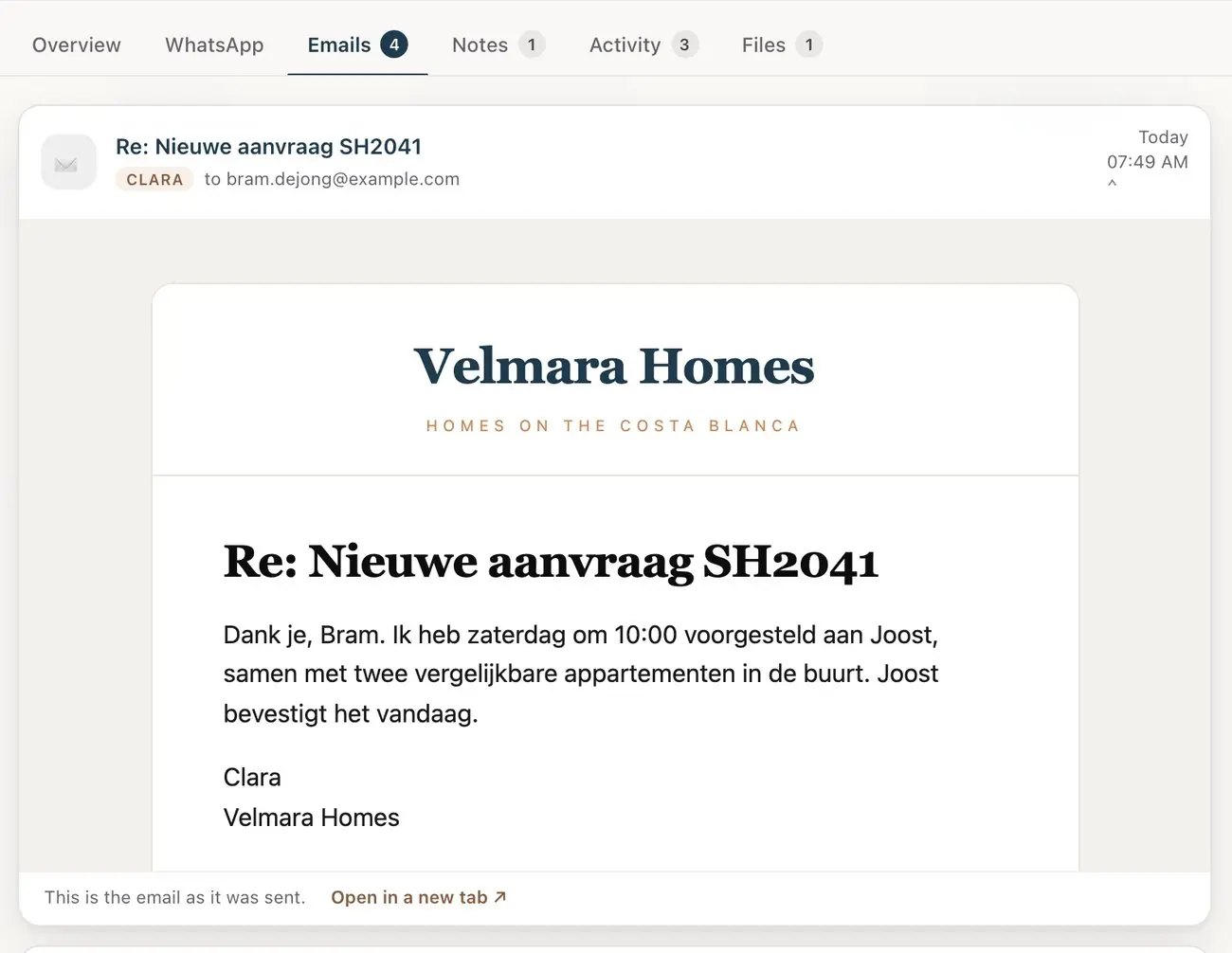
Every conversation with a client is kept with the client, not in one agent's inbox.
How it works
- Email goes out from your own mailbox, and replies come back onto the card once you connect it.
- Web chat on your website captures the client's details even before the assistant is switched on.
- WhatsApp in your own name and a phone line that answers use the same brain as the chat: they capture the lead, book the viewing and flag the hot ones.
WhatsApp and the phone line are set up with you rather than switched on from a settings page, because both need a number and an account in your company's name. They are not on the standard price.
08 · Stock and portals
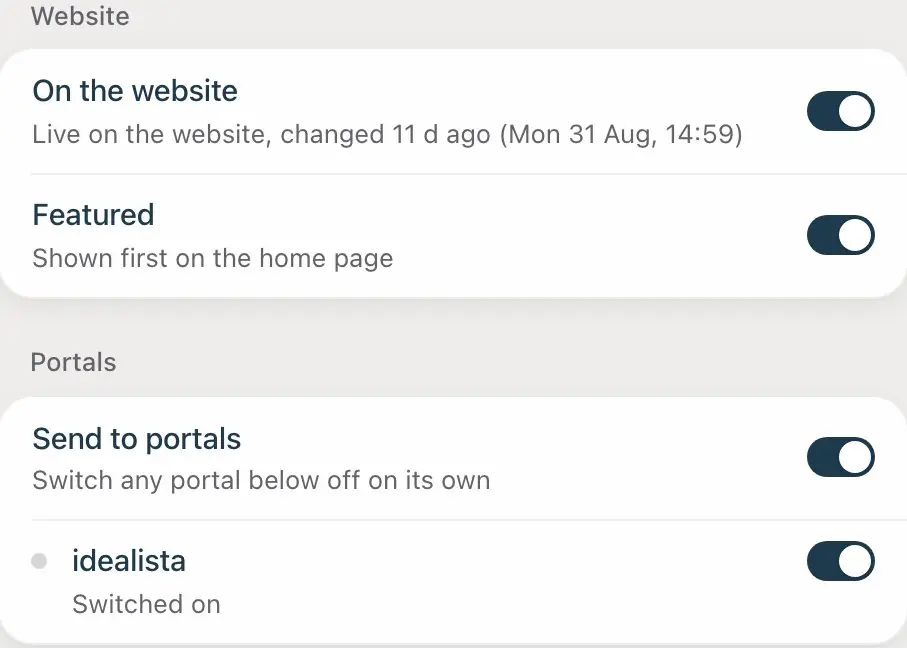
Your properties in one place. One switch per portal.
Change a price once and it changes everywhere. Take a property off one portal and leave it on the others.
How it works
- Edit your stock in the CRM, with photos, descriptions and status.
- Each property carries a switch per portal. Each portal or partner gets its own XML feed, filtered to what you chose.
- Stock from a developer or partner can come in as a Kyero XML feed, and a nightly job fills in missing English descriptions.
idealista works by file upload and needs idealista to accept your agency first. We help you apply; our own approval does not cover you.
09 · Your website
A website on your own domain, fed by the same stock.
No second system to keep up to date. A property you publish in the CRM is on your website, and an enquiry from your website is on your board.
How it works
- Set your domain, logo, colours, team page and information pages from the Website tab. The domain is checked and the security certificate issues itself.
- Give a new development its own microsite on its own address.
- Send a client a selection: a private, branded page of properties with the agent's reason for each pick.
- Print the viewing day: the same selection as an A4 pack in the client's language, with the schedule, a card per property with photo, facts, a map QR code and tick boxes, and a last page to compare and pick a Top 3.
- Your domainYour name in the address bar, not ours.
- Live stockPublished once in the CRM, shown on the site.
- MicrositesOne address per development.
- SelectionsA private page per client, with the reasons.
- Viewing dayThe selection printed as a tick-box pack for the round.
- Web chatEnquiries go straight to the board.
- Spam filterBots are archived, not assigned.
10 · Deals and commissions
From reservation to completion, split to the cent.
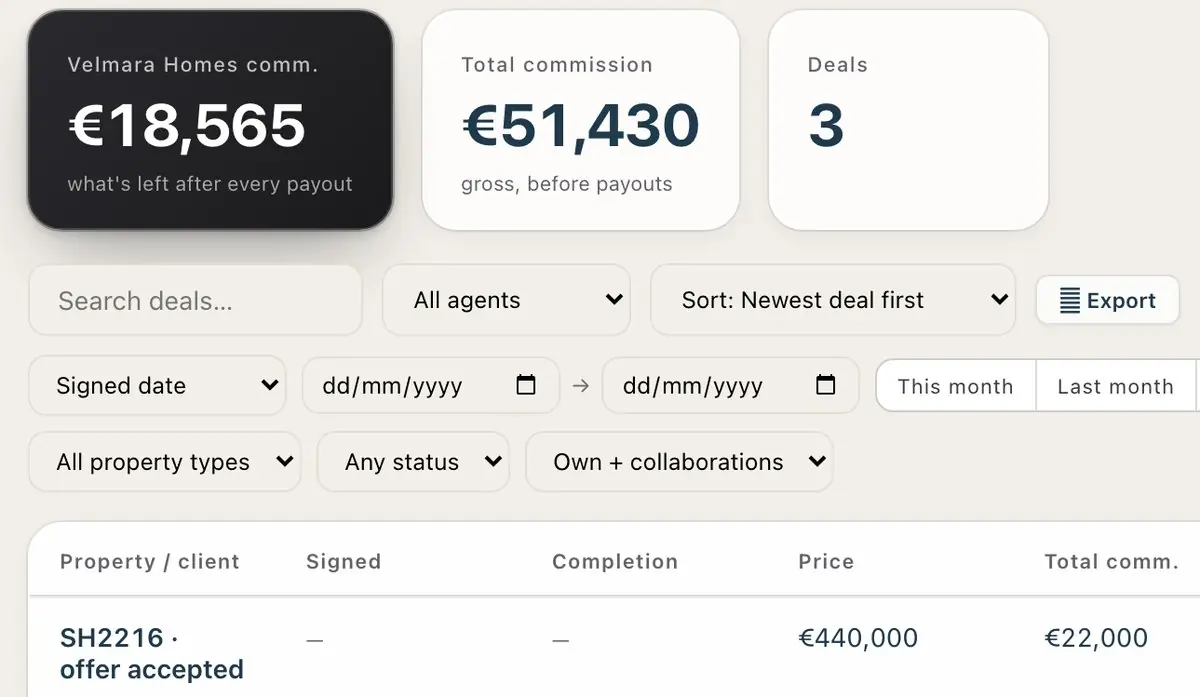
Book a sale once and the deal, the commission split and the after-sales file all exist.
How it works
- Booking a sale writes the deal and opens its after-sales file in the same step.
- Commission is worked out in whole cents: your fee, minus the collaborating agency and any gifts, then the selling, listing and manager shares, with a second agent if there is one.
- A completion calendar, extras, and a paid checklist where agents see only their own lines.
- A sales document with commission, VAT and the split, in your letterhead.
11 · After-sales
After the handshake there is still a completion date.
Deposits, stage payments, the mortgage and the completion date are tracked, and chased, until the keys are handed over.
How it works
- The dates are taken from the contract: deposits, stage payments, completion, mortgage.
- Reminders go out 7 days before and on the day, then every day while a payment is still open.
- A board, a planner and a file per sale, with the contacts and a checklist.
- MilestonesRead from the signed contract.
- Chasing7 days before, on the day, then daily.
- PlannerEvery completion coming up, in order.
- File per saleContacts, checklist, documents.
12 · Contracts
Draft, sign online and send the signed copy, without Word.
The assistant drafts from the documents you upload, the parties sign on a link, and the signed pack reaches everyone by itself.
How it works
- Drafted from your documents: upload the papers, scan the ID documents, and the gaps are filled in. Edit it, then export as PDF or Word.
- Signed online: reservation and purchase contracts go out as a signing link, with a progress bar per contract.
- Once everyone has signed, the signed PDF is emailed to all parties automatically.
- Listing agreements come ready in several languages, checked by native speakers.
- AI draftingFrom your uploaded documents.
- ID scanNames and numbers filled in.
- E-signingA link per party, locked once signed.
- Signed packSent to every party by itself.
13 · Accounting and quotes
Invoices, expenses and the numbers that matter.
Invoice the commission from the deal it came from, keep the receipts with the costs, and see profit and late payers without a spreadsheet.
How it works
- Invoices with payments, PDF and batch printing. Estimates that turn into invoices.
- Expenses with a photo or PDF of the receipt, and a list of costs still missing an invoice.
- A dashboard: profit on invoiced and on cash basis, this year against last, late payers and VAT per quarter.
- A tax estimate built on Spanish company tax and VAT, clearly marked as a steering figure and not a filing.
- AI quotes for works, priced only from your own price list and the links you paste. Anything without a price is flagged, never invented.
- InvoicesFrom the deal, in your name.
- EstimatesConverted in one click.
- ExpensesWith the receipt attached.
- ProfitInvoiced and cash, year on year.
- VATPer quarter, at a glance.
- QuotesYour prices, nothing guessed.
14 · Marketing and reviews
Stay in front of the people who already know you.
Post to your pages, send the newsletter and ask for the review, from the same place your clients and stock already live.
How it works
- Social: connect your Facebook Pages and Instagram, keep a library and plan posts on a calendar.
- Newsletter: a branded email sent as your agency, segmented by the client's language.
- Reviews: about three days after a sale completes, the client is asked for a Google review, in their own language.
- Facebook and InstagramLibrary, calendar, posting.
- NewsletterBy language, in your branding.
- Google reviewsAsked for at the right moment.
- Long-term dripBuyers who are not ready yet.
15 · Team, control and your data
Every person their own login. Every change can be undone.
You decide who sees what. Every change a person makes is recorded, and your data is yours to take.
How it works
- Add a person and they get their login by email. Per person, choose whether they receive new clients, see everyone's clients, see the whole agenda, publish properties, or delete deals.
- History records every change to clients, deals and properties, before and after, with undo. It warns you if the record has changed since.
- White label throughout: your name, logo, colours, domain and mailbox. Your clients never see ours.
- Export everything from the setup page, as one download or a spreadsheet per table, without asking us. Close the account and it is erased after 30 days.
- New starters get an in-app guide for their role and a first-login tour.
16 · Company cars
Shared cars, and always the name of who was driving.
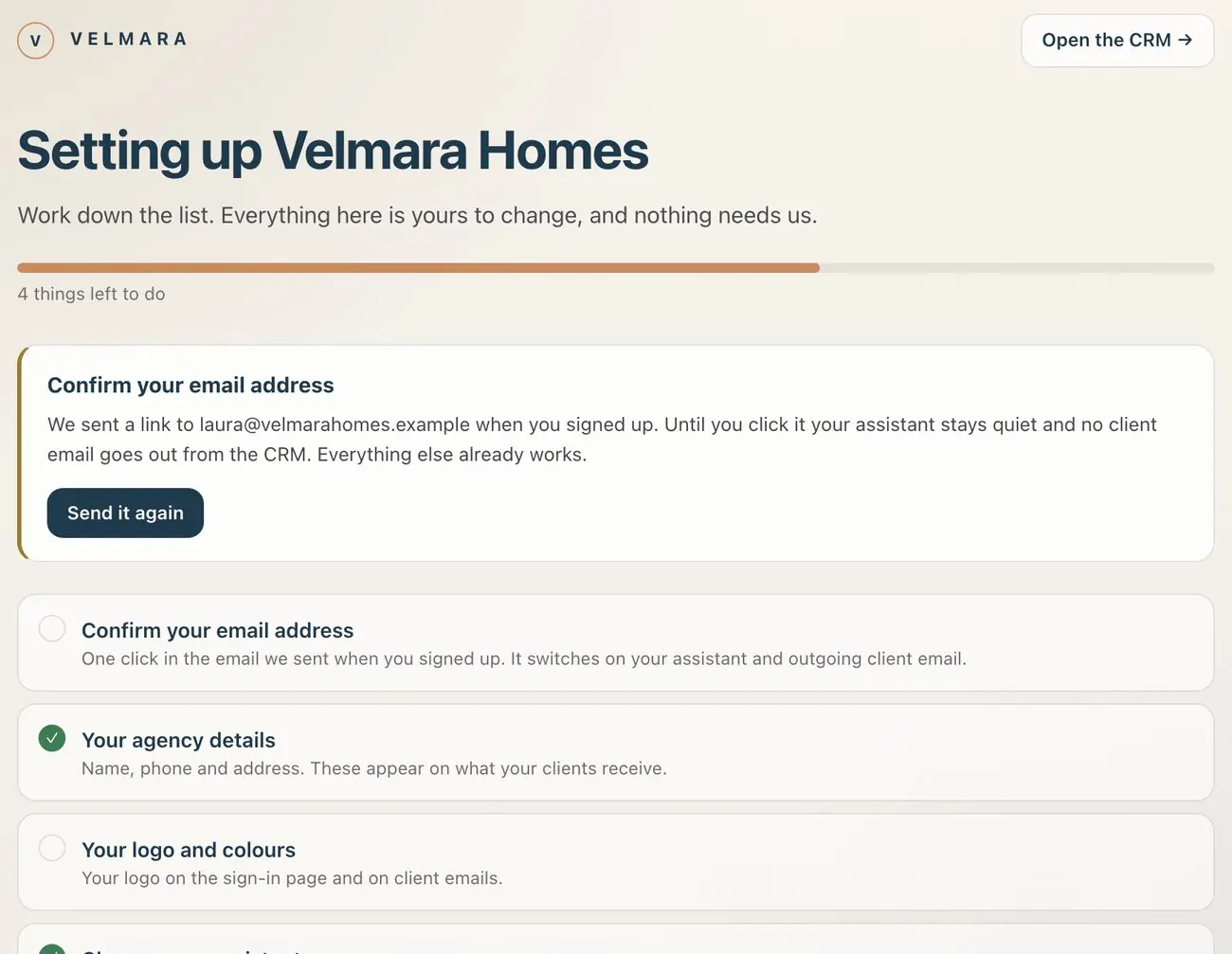
A code inside each car. Whoever scans it is the driver until the next person does, so a fine that arrives three weeks later has one answer.
How it works
- Add a car and print its sticker. The same link also works on an NFC tag, if you prefer a tap.
- An agent scans it with the phone camera and is checked in on the spot. They sign in the first time; after that, one scan is enough.
- Each scan saves where the phone is, and handing back saves where the car was left. A scan far from that spot is marked and the office is told, so nobody checks in from a photo of the code. Nothing is tracked in between.
- Book a car for a viewing, report a problem such as low fuel or a warning light, and see who has which car right now.
- A fine arrives: pick the car and the time on the notice and see who was driving. The whole log exports to a spreadsheet.
One client, start to finish
Watch one buyer move through the whole agency without leaving the system.
- The enquiry arrivesA Dutch couple writes through a portal at 23:40.Enquiries
- The right agent gets itRouted to your Dutch speaker, who is not on holiday.Routing
- Answered in a minuteIn Dutch, from your address, with the questions that matter.Assistant
- QualifiedBudget and intent known before an agent spends a call.Pipeline
- A selectionFive properties on a private page, each with a reason.Website
- The viewingIn the agent's agenda, with a printed viewing-day pack in their hands. The keys are signed out and come back.Agenda and keys
- The reservationDrafted from their documents and signed on a link.Contracts
- The dealBooked once. The commission split to the cent.Deals
- To completionDeposits and the completion date chased until the keys.After-sales
- The invoiceFrom the deal, in your name.Accounting
- The reviewAsked for three days after completion, in Dutch.Marketing
- Next timeOn the newsletter, and remembered when they want to sell.Marketing
All of it on every seat. There is no cheaper version with the useful parts taken out.
30 days free, no card. Forward one portal enquiry and watch it go through the modules above.